

tl;dr — One of the most common security issues we encounter is everyone in the store uses the computer as a full Administrator account.
Windows User Accounts
If you’re running consignment software, there’s a good chance you’re running it on a Microsoft Windows-based system. Out of the box, Microsoft walks you through setting your username and password. The only issue is, this account is the full System Administrator account.

There’s just no need to be logged-in as an Administrator for day-to-day work and especially not with staff accessing the system all day.
Microsoft Provides An Easy Solution
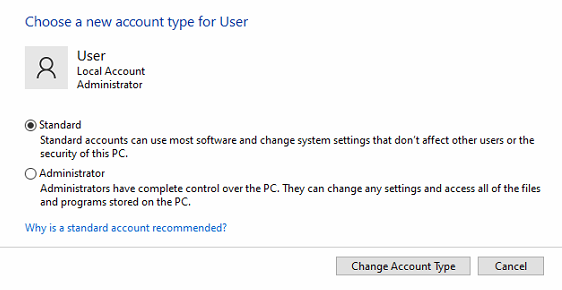
While it’s not clearly outlined during the setup of a new Windows PC and the information seems to only be available to nerds that have worked with systems for years, Windows has two different types of user accounts:
- Administrator
- Standard User

The latter is the recommended account type to use for day-to-day tasks, only logging-in as the Administrator when you need to make major changes — e.g. install a new program, install/configure a printer, etc. If you don’t have this setup already, you can create a new Windows User account to be the Administrator and then set the daily-driver account to a Standard User.

So in simplest terms, at a bare minimum you should have one user account that is an Administrator and one user account that is a Standard User.
Only the Standard User account is utilized as the daily-driver account.
This one, small change helps prevent unwanted changes to the system. Combined with a good adblocker (e.g. uBlock Origin) and these two help reduce a huge amount of issues for consignment/resale stores.

Dean
I am a Software Developer, System Administrator, and consignment software specialist. I currently manage hundreds of consignment workstations, point of sale systems, and database servers all across North America and I am the developer of Peeps' Software, Peeps2Go, and Peeps' Consignor Login for iOS and Android. I've been helping consignment & resale store-owners since 2003. I started The Computer Peeps in February of 2010. Peeps' Software launched in 2016 and is now on hundreds of systems all across North America. I have successfully converted hundreds of stores from all of the major consignment software systems. After 20+ years of working with consignment stores, I understand the unique challenges consignment & resale store-owners face. From electrical issues in old buildings or strip malls, to advocating for them when their old consignment software keeps crashing.